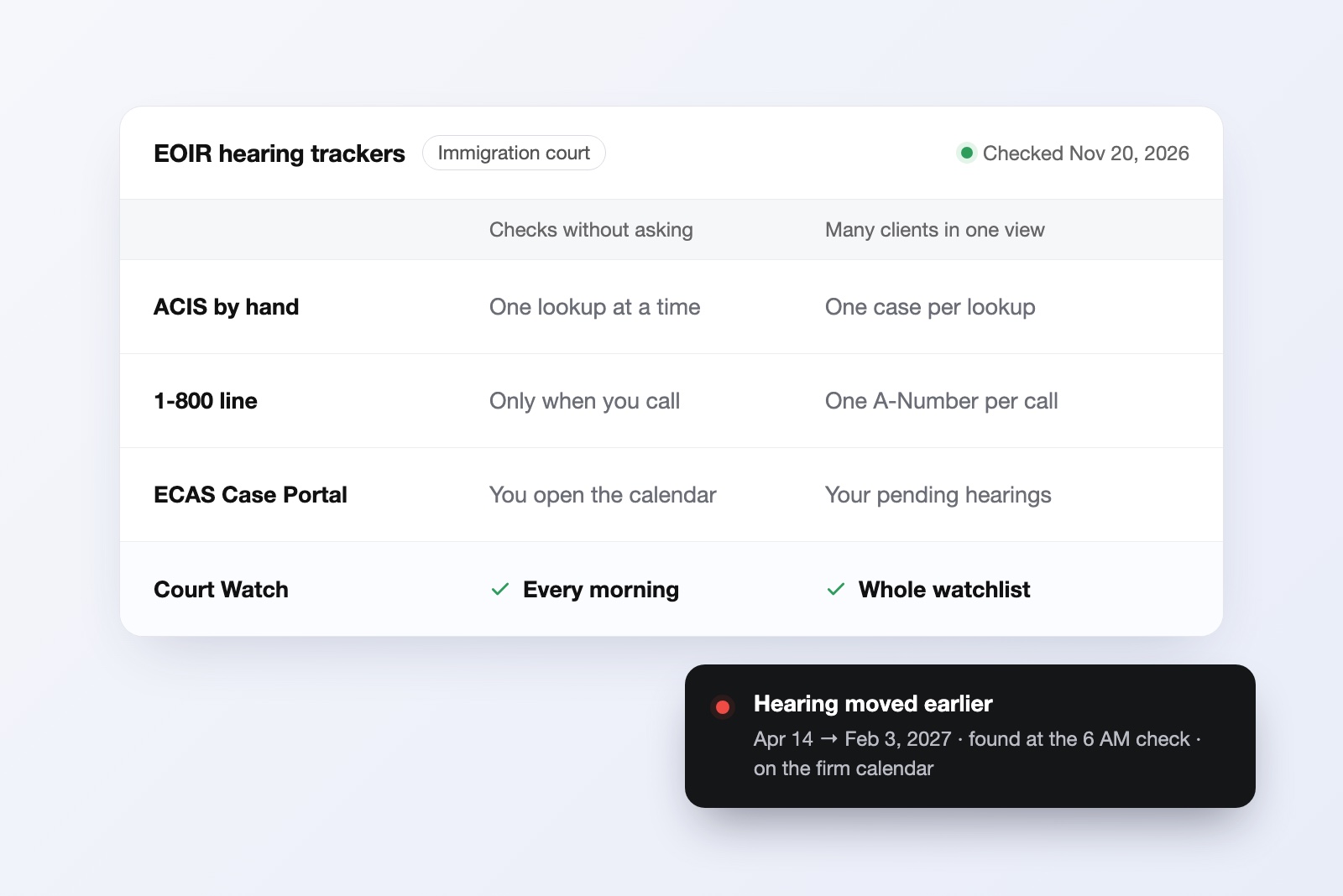
For a firm watching more than a handful of clients in removal proceedings, our pick is Court Watch, because it checks every watched case every day and flags hearings moved earlier, the change that leaves the least time to react. For a few cases, EOIR’s own tools may be enough: the ECAS Case Portal calendar and a lookup in ACIS. This guide compares eight ways to keep up with immigration court hearings and says which fits which firm.
Lexfill builds Court Watch, so read this as one vendor’s guide. Every other claim links to the vendor’s or EOIR’s own page, checked on November 20, 2026. If you only want to see how Court Watch works, start here.
How we compared
We compared each option on the same seven questions, which are the columns of the table below: who it is built for, where the hearing date comes from, whether it checks without someone asking, whether it shows many clients in one view, whether it tells you when a date moves, what price it publishes, and where we read all that.
Our sources are the vendors’ own websites and app-store listings, EOIR’s pages, the EOIR Policy Manual and the Code of Federal Regulations, all opened on November 20, 2026. There are no ratings, reviews or customer quotes here, only what each product publishes. Where we found nothing, we say “we found no … on its public pages as of November 20, 2026”, which is not the same as saying a product cannot do it. Court Watch facts come from the product itself. This guide is general information, not legal advice.
The short answer
- Court Watch (Lexfill): our pick for firms with a removal docket. It checks every watched case daily and alerts the firm when a hearing moves.
- ACIS by hand: EOIR’s own case lookup. One case per lookup, and we found no alerts.
- The 1-800-898-7180 line: the same kind of answer by phone, one A-Number per call.
- ECAS: the Case Portal calendar of pending hearings for your own cases, and documents served to your email.
- Practice-management calendars: hold the dates your team enters. We found no automatic EOIR checks on their public pages.
- Lawfully Pro: says it tracks EOIR along with USCIS, NVC and DOL, with bulk upload.
- Apps built for individuals: one person’s case, with alerts on some paid plans.
- Building your own lookup: a developer tool that looks up one case per run.
What a hearing tracker has to catch
A hearing tracker has to catch a hearing that moves in either direction, as soon as EOIR shows the change. A hearing that moves later costs time. A hearing that moves earlier can arrive before the next time anyone thinks to look. Our immigration court postponement data shows how often hearings are reset, court by court.
Two limits apply to every option here, because they come from EOIR. Its case status page says “the Automated Case Information system will not reflect a new hearing date until a new date has been set by the immigration court”, and that “court documents such as hearing notices are the official source of information on case status.” A tracker is an early warning. The notice is the record.
The options at a glance
Prices are printed as each vendor publishes them. Where we could not verify something, the cell says so.
| Option | Built for | Where the hearing date comes from | Checks without someone asking | Many clients in one view | Tells you when a date moves | Published price | Source, checked |
|---|---|---|---|---|---|---|---|
| Court Watch (Lexfill) | Immigration firms with a removal docket | EOIR’s public Automated Case Information | Yes, every watched case every day at 6:00 a.m. Pacific | Yes, the firm’s watchlist | Yes, in the app, on iPhone and by email; a hearing moved earlier is marked urgent | No published price; first 3 cases free | Lexfill, November 20, 2026 |
| ACIS by hand | Anyone with an A-Number | EOIR’s Automated Case Information | No, one lookup at a time | No, one case per lookup | We found no alerts on EOIR’s pages | Not stated on its site | EOIR, November 20, 2026 |
| 1-800 line | Anyone with an A-Number; English and Spanish menu | EOIR’s automated case information line | No, only when you call | No, one A-Number per call | Only when you call | Not stated on its site | EOIR Policy Manual 1.5(c), November 20, 2026 |
| ECAS Case Portal + e-service | Attorneys and accredited representatives of record | EOIR’s Case Portal calendar; notices served by email | Served documents are emailed; the calendar is checked by you | Yes, pending hearings for the respondents you represent | Served documents reach your eRegistry email; we found no separate date-change alert | Not stated on its site | EOIR, November 20, 2026 |
| Practice-management calendars | Firms running their cases in one system | Entered by your team (see section 5) | We found no EOIR checks on the pages we read | Yes, the firm calendar | Reminders on dates already entered, where offered | Varies by vendor (see section 5) | Vendor pages in section 5, November 20, 2026 |
| Lawfully Pro | Firms and nonprofits | “Real-time tracking for USCIS, NVC, DOL, and EOIR” | Not stated on its site | Yes, with bulk case upload | Automated emails for case changes | Not stated on its site; 14-day free trial | Lawfully, November 20, 2026 |
| Consumer apps | Individuals (see section 7) | Varies by app (see section 7) | On some paid plans; one checks weekly | Several saved cases in one app (Immigratus); no firm plan found | Alerts on some paid plans | Free; $4.99 to $6.99 in-app; $15.99 a month (see section 7) | App pages in section 7, November 20, 2026 |
| Developer lookup (Apify) | Developers | EOIR case information, by A-Number and nationality | None found on its page | No, one case per run | None found on its page | From $1.00 per 1,000 results | Apify, November 20, 2026 |
1. Court Watch (Lexfill)
Court Watch checks every case on a firm’s watchlist against EOIR’s public case information every day and tells the firm when a hearing changes. The scan runs at 6:00 a.m. Pacific, and a newly added case is checked right away. See the Court Watch page for the full product.
- Setup. Enter the client’s A-Number and nationality and press Watch. Cases can also be imported from a spreadsheet, from Clio or from ECAS.
- What it flags. Hearings scheduled, postponed, cancelled or moved earlier. A hearing moved earlier is marked urgent and files a task to review the client’s payment plan.
- History. Every change is kept with the old date, the new date and when it was found. Nothing is overwritten.
- Alerts and calendar. Alerts arrive in the app, on iPhone and by email. Hearings sync to the firm calendar feed, which attorneys can subscribe to in Google Calendar, Outlook or Apple Calendar.
- Trying it. Your first 3 cases are free. We do not publish a price list for it.
What it does not do. Court Watch reads EOIR’s public Automated Case Information, so it sees only what that system shows, and a new date appears only after the court sets it. It is not affiliated with EOIR and does not replace the hearing notice. It does not file anything or tell you what to do about a moved hearing; that stays with the attorney. The longer write-up walks through a moved hearing from alert to calendar.
2. Looking clients up in ACIS by hand
ACIS is EOIR’s own case lookup, and it answers one case at a time. EOIR’s case status page links to the online portal, which now opens at acis.eoir.justice.gov. Per the EOIR Policy Manual, section 1.5(e), it gives “basic information about the status of certain cases”, and “not all cases, or all information about a case is displayed.” It shows the primary case only, and the most recent case for an A-Number; bond information comes from the local court.
For a few clients, a regular lookup works. For a full docket it means one lookup per client per check, and we found no alerts on the EOIR pages we opened as of November 20, 2026. Our step-by-step guide to checking EOIR case status covers the lookup, and the immigration court directory lists each court.
3. The 1-800-898-7180 line
EOIR’s automated phone line gives the same kind of answer as ACIS, one A-Number per call. According to the EOIR Policy Manual, section 1.5(c), it gives the next hearing, the case-processing clock in clock cases, and immigration judge decisions. The caller enters the A-Number, adding a 0 in front of an 8-digit one, and the menu is in English and Spanish. It gives no bond or motion information. The numbers are 1-800-898-7180 and 304-625-2050 (TDD 800-828-1120), per EOIR’s case status page, and the manual also lists 240-314-1500.
4. ECAS: the Case Portal calendar and emailed service
Of EOIR’s own tools, ECAS is the one that shows an attorney many clients’ hearings in one place. ECAS has been mandatory since February 11, 2022 and is available at all immigration courts and the BIA. Attorneys and accredited representatives can “view calendar of future hearings for respondents they represent” in the Case Portal, for cases with an accepted EOIR-27 or EOIR-28. The ECAS FAQ adds that “the calendar function only shows pending hearings.”
Documents are served by email. Under 8 CFR 1003.32(b), “the immigration courts will use the email address provided through eRegistry for electronic service”, and “EOIR will consider service completed when the electronic notification is delivered to the last email address on file.” The rule’s preamble says representatives “should vigilantly monitor their email inboxes, including any spam folders.” Under 8 CFR 1003.37, a judge’s decision can also be served by electronic notification. As of November 20, 2026 we found no EOIR page describing a separate email when a hearing date changes.
So the calendar is there when you open it, and served documents arrive in an inbox. Someone still has to look at both.
5. Practice-management and calendar tools
Practice-management tools keep the hearing dates your team puts in them. As of November 20, 2026, we found no automatic EOIR hearing checks on the public pages we read. Court Watch can sit alongside any of them: it needs only the A-Number and nationality, and it imports from Clio.
- Docketwise. On its product summary and features page, EOIR appears as a form library, and status tracking is described for USCIS: “Track your cases with updates from USCIS.” We found no immigration court hearing tracking on those pages as of November 20, 2026.
- MyCase. Its immigration page offers “case tracking (available through the DocketWise integration)”. We found no mention of EOIR or hearings on that page as of November 20, 2026.
- Clio. Its immigration page refused our automated check, so we could not read it. Search snippets describe calendar reminders for hearings, events drafted from a notice for you to confirm, and e-filing that does not submit to the immigration courts. We list these under “What we could not verify”.
- LollyLaw. Its home page lists “125+ immigration forms from USCIS, DOJ, EOIR, and the FBI”. We found no hearing tracking, case-status checks or calendar sync on the feature overview as of November 20, 2026.
- eimmigration (Cerenade). Its pricing page lists a “USCIS & Visa Bulletin Tracker” premium feature ($15 per feature per user a month on lower tiers), “Case Status Lookup” and an “Appointment Calendar”. We found no EOIR or hearing mention on that page as of November 20, 2026.
- CampLegal. Its removal defense page describes a “hearing-first calendar” that ties master, individual and bond hearings, motions to reopen and BIA deadlines to the case, with “reminders that route to the responsible attorney”. We found no statement that it checks EOIR for changes on that page as of November 20, 2026.
- INSZoom (Mitratech). Mitratech’s June 10, 2026 post says “activity in Lawfully Pro flows back into INSZoom”. We could not open its features page, so its court-date features are under “What we could not verify”.
6. Lawfully Pro
Among the firm products we checked, Lawfully Pro is the only one besides Court Watch that says it tracks EOIR. Its product page offers “real-time tracking for USCIS, NVC, DOL, and EOIR”, bulk case upload, automated emails for case changes and a 14-day free trial. We found no price on that page as of November 20, 2026. LegalServer’s help center says Lawfully Pro can “automatically sync DOL, USCIS, NVC, and EOIR case status updates into LegalServer”, marked “Limited Release”. We could not confirm how often it checks EOIR, whether it alerts on a hearing change specifically, or whether it syncs to a calendar.
7. Apps built for individuals
Consumer apps are aimed mainly at people following their own case, and some alert on a change for a fee.
- Immigratus (iOS and Android). Its App Store listing takes an A-Number and nationality, saves several cases and notifies on a hearing or status change, with reminders 7 days and 1 day before. Hearing alerts are a $4.99 in-app purchase, or $6.99 with AI insights. It lists attorneys among its audience and states it is “not affiliated with … EOIR”.
- MigraConnect. Its EOIR tracker offers free lookups with no account, and alerts when “the date, the judge or the asylum clock changes” under paid MigraConnect+. We found no price on that page as of November 20, 2026.
- A-Tracker. Its site checks “your A-Number weekly” and sends a WhatsApp update (its Spanish FAQ says SMS) for $15.99 a month. We found no statement that it queries EOIR on its site as of November 20, 2026.
- USCIS Case Tracker. Its site offers “hearing reminders for EOIR cases”, free, with automatic updates for USCIS and NVC cases only.
8. Building your own lookup
A developer can script the lookup, one case per run. The Apify actor burbn/automated-case-information is one example: it takes an A-Number and nationality, costs “from $1.00 / 1,000 results”, and names law firms among its users. We found no built-in schedule or alerts on its page as of November 20, 2026, so the comparing, alerting and history are yours to build.
What we could not verify
These claims appeared only in search snippets or on pages that blocked our check on November 20, 2026. Check them yourself before relying on them:
- That ACIS asks for the person’s nationality. ACIS runs as a web app, and the EOIR pages we opened do not say so.
- That the 1-800 line answers 24 hours a day, 7 days a week.
- That ECAS sends an attorney its own email when a hearing date changes, as opposed to serving the new notice.
- Clio’s calendar features for hearings, events drafted from notices, and immigration court e-filing (Clio’s page blocked our check).
- INSZoom’s court-date features: dates set up from government notices, Outlook alerts and an “Upcoming Case Activity” report (Mitratech’s page was not opened).
- Lawfully Pro’s check frequency, hearing-change alerts, calendar sync and price.
- MigraConnect+ pricing.
- That A-Tracker reads its updates from EOIR.
Which one fits your firm
- A few cases, and you are attorney of record in ECAS. The Case Portal calendar plus regular ACIS checks may be enough. Keep an eye on the eRegistry inbox, spam folder included.
- A nonprofit on LegalServer. Ask Lawfully and LegalServer about the EOIR sync, which LegalServer lists as a limited release.
- An individual following their own case. ACIS, the 1-800 line or a consumer app.
- A firm with a removal docket. Court Watch. It checks every watched case every day, keeps the history of every change, and works next to the practice-management tool you already use.
Frequently asked questions
What is the best EOIR hearing tracker for law firms?
For a firm watching more than a handful of clients in removal proceedings, our pick is Court Watch, which Lexfill builds. It checks every watched case against EOIR’s public case information every morning and flags hearings that are scheduled, postponed, cancelled or moved earlier. A firm with only a few cases can rely on the ECAS Case Portal calendar plus regular ACIS checks. Individuals can use ACIS or a consumer app.
Does EOIR send an alert when an immigration court hearing date changes?
EOIR serves documents by email to the attorney’s eRegistry address, and treats service as complete once the email is delivered. As of November 20, 2026 we found no EOIR page describing a separate alert when a hearing date changes. EOIR also says its online case information will not show a new date until the court has set one, and that hearing notices are the official source.
How do I check the next hearing date for an immigration court case?
Look the case up in EOIR’s Automated Case Information (ACIS) online by A-Number, or call EOIR’s case information line at 1-800-898-7180. Both give the next hearing for one case at a time. Attorneys of record can also see pending hearings for the respondents they represent in the ECAS Case Portal calendar. The hearing notice remains the official source.
Can I see all my clients’ immigration court hearings in one place?
Yes, in two ways. The ECAS Case Portal shows attorneys a calendar of pending hearings for respondents they represent, where an EOIR-27 or EOIR-28 was accepted. A tracker such as Court Watch keeps the firm’s whole watchlist in one view, checks each case every day and records each date change with the old date, the new date and when it was found.
Do practice-management tools like Docketwise, Clio or MyCase check EOIR automatically?
As of November 20, 2026 we found no automatic EOIR hearing checks on the public pages of Docketwise, MyCase, LollyLaw or eimmigration. CampLegal describes a hearing-first calendar with reminders but does not say it checks EOIR. We could not open Clio’s immigration page. These tools hold the dates your team enters, and Court Watch can work alongside them.
How often should a firm check its clients’ EOIR hearing dates?
That is a judgment for the attorney, and EOIR does not set a schedule for it. Hearings move in both directions, and EOIR’s case information shows a new date only after the court sets it. Court Watch checks every watched case once a day, at 6:00 a.m. Pacific, and checks a newly added case right away.
The verdict
EOIR gives every firm the raw tools: ACIS, the phone line, the ECAS calendar and emailed service. What none of them does is look for you, every day, across every client. For a firm with a removal docket, that is the job Court Watch does, and why it is our pick. If you are also choosing the case system around it, see our guide to immigration software with AI.
See how Court Watch works. Your first 3 cases are free.